Friday, February 4, 2011

Scientists reverse old age symptoms in mice


In case rats at the Dana-Farber Cancer Institute and Harvard Medical School were feeling old, some lucky lab rats found their decrepit organs rejuvenated back to youth in an experiment conducted by a group of Harvard scientists, with far-reaching implications for human ageing.
The youth elixir in this experiment is an enzyme called telomerase, which prevents the natural deterioration of telomeres, a protective cap found at the tip of chromosomes.
Most ageing occurs because of the deterioration of telomeres. Three scientists were awarded the Nobel Prize last year for the discovery of telomerase.
In the experiment, led by Dr. Ronald DePinho, a cancer geneticist at the Dana-Farber Cancer Institute and Harvard Medical School, scientists took six-month-old mice and engineered them with a telomerase gene, which could be toggled on or off through artificial means. When turned off, the mice manifested typical symptoms of age often seen in humans in their 80s and 90s, such as barrenness, shrunken brains, and loss of smell.

"In this state we flipped the [telomerase] gene back on," DePinho explained to PCMag. "We expected to see a slowing of the ageing process, but instead what we witnessed was a dramatic reversal." For instance, the mice's coat hairs were restored to sheen, fertility enhanced, and smell restored.
Since the findings were first published yesterday in Nature magazine, other scientists have warned that artificially turning on and off a telomerase switch in humans could actually trigger cancer cells. DePinho added that decreasing telomere reserves was just "one of many factors" that can damage cells, and that "just correcting one factor won't necessarily extend lifespan."
Furthermore, a human application is still at least a decade away, he predicts. Instead, the biggest take-home from the experiment is that ageing cells can be rejuvenated.
"It teaches us that if the underlying cause of ageing is eliminated, that tissues retain a remarkable capacity to rejuvenate—so there is a point of return on the ageing process."

                                          SUBSCRIBE TO BLOG

Princeton engineers create laser from air

Princeton engineers create laser from air

In the "so-futuristic-it-hurts" category, Princeton engineers have come up with a way to create a laser beam out of thin air. Their method, published in the journal Science yesterday, uses a focused laser pulse which causes another beam to be created from the air, carrying fingerprints of any molecules it encounters to a receiver. The effect comes from the first laser energizing oxygen atoms in a specific area and, as they cool, causing them to release infrared light, exciting more atoms and amplifying the process. 
Besides the cool factor that comes with being able to create a laser beam out of nothing but surrounding atmosphere, the device is a very effective way of detecting contaminants, like bombs or hazardous gases, research group leader Richard Miles said in this article on physorg.com. According to the story, the group envisions a device small enough that it could be mounted on a tank and used to search a roadway for bombs, making it not just cool as a gadget, but also a potential life saver for troops in Iraq and Afghanistan

                                                      SUBSCRIBE TO BLOG

Report: Facebook to overhaul commenting system for third-party sites

 Facebook is preparing to launch a completely revamped commenting system for third-party sites in the next few weeks.
CNet's Caroline McCarthy has reported that the system would allow Facebook's software to power commenting on high-profile sites and blogs.
Facebook is already present in the comments section of a lot of sites. Blogs or other Web sites can connect to Facebook by integrating the developer API. "Social commenting" is also available to build into a site as a widget.
Users can also set up alerts that are posted on their Facebook walls, advertising when they have commented. McCarthy's sources said that the new platform is a deeper expansion of these existing services. Facebook will handle all aspects of the new system, including the log-in, posting, and cross-promoting the comments on other users' pages. McCarthy also said that comments will likely be promoted on the fan pages for media outlets, and that the "like" button will be a prominent feature of the platform.
"We're testing an updated plugin that leverages authenticity and social relevancy to increase distribution," a Facebook spokesperson told PC Mag. "We're testing the plugin on our Facebook Blog and Developer Blog but have no further details to share at this time."
The concept is similar to that of TimesPeople, the commenting system the New York Times has been using in recent years.
Additionally, comments on People Magazine's Web site are already handled by Facebook. All Things D's Peter Kafka said. Facebook will be courting other major media companies to sign on with the new system.
Interestingly enough, Facebook's program could allow users to connect with Google, Yahoo, or Twitter usernames. It's a bit surprising, considering Facebook's relationship with both Google and Twitter has been rocky in the past.
Tensions between Facebook and Google have been slowly building over the past several months. After Google barred Facebook from its Contacts API. Facebook fired back by posting a loophole around the blockage.
On top of that, in November, Facebook introduced what some interpreted as a challenge to Gmail, a retooled messaging system that combines email, SMS, IM, and other messaging services.
Facebook has also blocked a Twitter application that finds friends by browsing through a user's Facebook friend list.
This new system could take a bite out of the business of commenting start-ups like Echo and Disqus. McCarthy's sources pointed out that the revamped platform is in direct competition with these newer, smaller companies.
                                                  SUBSCRIBE TO BLOG
Android Market finally gets a web store

The Android Market has finally joined the rest of the other major platform-owned mobile app stores (from Ovi to Apple to BlackBerry) by launching a web version of the store – market.android.com. Now users have the opportunity to view, access, and then single-click download Android Market applications on the web.
The interface is clean and has plenty of useful filters from compatibility to cost. The app download process is also simple - pay (if required) via Google Checkout, choose the device (one of the phones you’ve accessed the market with before, when signed in), click install, and the app arrives over-the-air (OTA) . You can manage your account here as well, assigning names to the devices for easy access later, and more.
All this makes web access of the Android Market a definite boon for those not in Wi-Fi areas, or those lacking or not wanting to use their mobile GPRS/EDGE or 3G connectivity.
The uncertain and sometimes expensive nature of mobile data usage/connectivity is not the only reason for the creation of a web mobile app store. App discovery is bound to be, and is, much easier on larger screens, and, the advantage to the app developers themselves obvious. App sharing via the web is also possible, sending app links via Twitter or email. App pages can also be much more elaborate (with high-res images and videos), allowing developers to better detail and sell their product to potential customers.
With the release of the web-store, Google has also announced some other long-awaited benefits to the developers, introducing in-app purchases and thereby opening up a world of add-on content, promotion and cross-promotion, something that’s obviously monetarily exciting for developers, even those creating free applications. This functionality will be available by the end of March, with the release of the latest SDK.
Developers will also be to give different prices for their apps in different currencies, and so avoid the rough, unrounded numbers common with currency conversions.
Check out the web-version of the Android Market here, and let us know what you think in the comments section below.
                                                 SUBSCRIBE TO BLOG

Tuesday, February 1, 2011

Build a 3D Home Theater PC With Sandy Bridge


Follow our advice to construct your own 3D-ready home theater PC based on Intel's newest CPU line.

Today's personal computers come in a variety of designs and sizes--the era of the one-size-fits-all beige box has long passed. But as our living rooms become more theaterlike, with multichannel speaker systems and big-screen high-definition TVs, the thought of plugging a boxy PC into an entertainment center seems unappealing.
The HTPC , installed in an AV rack, along with a set-top box and an AV receiver .Enter the home theater PC. An HTPC is a specially built system that lives alongside your other audiovisual components and is designed to look like it belongs in the same rack as a multichannel receiver, satellite or cable set-top box, and other devices. The HTPC can be the repository for your entire digital media library; you can view your home video and photographs on the big screen and hear digital music on high-quality speakers, or share everything with other PCs over your home network. The HTPC also gives you the ability to play 3D Blu-ray movies (as well as standard Blu-ray and DVD movies).

Intel's Sandy Bridge Processor

If you want to build such a system, make Intel's new Sandy Bridge CPU the core ingredient. When Intel designed Sandy Bridge, the company built a graphics engine right onto the CPU chip itself. Although it isn't a great graphics processor for games, the video engine is vastly improved over previous Intel efforts.
The CPU in this HTPC project is an Intel Core i3 2100S processor. The 2100S is a 3.1GHz dual-core CPU with 3MB of L3 cache that supports Intel's Hyper-Threading technology, so it can run four threads at once. This is the lowest-end 65W Sandy Bridge CPU. Intel also offers the 2100T, which is rated at 35W but runs at a somewhat slower 2.5GHz. However, the case you should use for this project is fairly roomy, so the faster, slightly hotter CPU will work fine.
Intel has beefed up the built-in video engine to enable full hardware acceleration of both decoding and encoding high-definition video. That includes all commercially used HD codecs, including Microsoft VC-1, MPEG-2, and H.264. As a result, the video engine fully accelerates Blu-ray playback, while the CPU just idles along. The graphics processing unit actually has dual video engines built in, enabling features such as picture-in-picture without getting the CPU involved. In addition, Intel's HD Graphics supports HDMI 1.4 and dual video blocks, which means that it can handle stereoscopic 3D Blu-ray playback.

The Sum of the Parts

A CPU alone does not make a system, of course. You should consider several factors when you determine the parts list for your home theater PC.
·         The case must blend into your AV component rack.
·         The motherboard should be compact, and it should support HDMI-out.
·         Memory needs to be reliable (low-voltage memory is preferable, to minimize heat and power).
·         The power supply has to deliver robust power without making a lot of noise.
·         If you plan to play Blu-ray discs, you need a Blu-ray drive.
·         If you'll use the HTPC as a media repository, you'll require a really big hard drive.
Let's take a quick look at the component matrix for this system, including the cost.
The motherboard is Asus's current top Micro ATX Socket 1155 motherboard, which is the socket that Sandy Bridge CPUs need. This particular motherboard also supports SATA 6 gbps (two ports) and USB 3.0. The Kingston LoVo supports voltages as low as 1.25V, which means less heat generation.


The nMediaPC 1000B case. This particular version includes the optional LED display on the front. Memory card and USB ports are hidden underneath a flip-down door.The nMediaPC case would certainly look at home in a typical AV rack. Toss in the Seasonic power supply, which is fanless, and the overall combination is pretty quiet, though not absolutely silent--the case itself has a pair of small, 60mm fans in the rear. The Seasonic X460W is rated as 80-plus gold, which means that it's very efficient when the system is idle as well as when it's running flat out. The result is less power consumption and heat generation--both of which are critical for a power supply without a cooling fan. It's also a modular power supply, so you can attach only the power connectors you actually need, reducing your machine's internal cable clutter.

This Silverstone NT07 looks a lot like a standard Intel cooler, but the fan has more blades and runs more quietly.The Silverstone NT07 rounds out the cooling. The interesting thing about this CPU cooler is that it fits into the same space as the standard Intel cooler, which makes installation easier. However, the fan has more blades and is quieter than the stock Intel cooler.
The 2TB Western Digital GreenPower won't win awards for raw hard-drive performance, but it is quieter and cooler, which is important. The 2TB capacity means plenty of storage for digital media. The Asus Blu-ray combo drive plays back Blu-ray movies, and can burn DVDs (and play DVD movies) as needed.
Finally, you'll need software. Windows 7 Home Premium (the 64-bit version, naturally) is the OS of choice. CyberLink's PowerDVD 10 Ultra 3D worked well in our 3D HDTV testing, so you'll need that for 3D Blu-ray playback. The entire package, including software, comes in at under $1000.

Build a 3D Home Theater PC With Sandy Bridge

Follow our advice to construct your own 3D-ready home theater PC based on Intel's newest CPU line.

Tips for Building Your System

Assembly is straightforward; you'll have no worries about graphics cards, though you might consider adding an HDTV tuner card.The nMediaPC case is roomy, and all the components are pretty standard, so building the system is a straightforward exercise. Still, every PC build is slightly different, so I'm offering a few tips and tricks that helped me as I built this system.
·         Install the power supply into the case before you install the motherboard. That will make life somewhat easier.
·         The nMediaPC chassis offers a removable bay for storage that extends across the width of the case. A pair of screws hold it in, and it easily slides out. Install the optical drive and hard drive, and then preattach power cables before reinstalling the bay. These cables are modular, so you can then run them to the power supply. I was able to use one cable (with multiple SATA connectors), which minimized cable clutter.
·         Motherboard configuration with the Asus board is dead simple. The new Socket 1155 motherboards now use EFI (extensible firmware interface) instead of the old BIOS setup routines. You can now use your mouse in the motherboard setup.
·         Attach the SATA cables to the motherboard prior to installing the storage bay--especially the hard-drive cable. You need to take this step because the first two SATA connectors point toward the back of the motherboard, rather than up from the motherboard. If you install the storage bay first, attaching the SATA cable to either of the first two connectors is quite awkward.
·         If you choose a different optical drive, make sure that it has a standard bezel, with buttons in the usual places. Some Blu-ray drives have oddly shaped bezels that may look cool but won't work with the flip-out door on the nMediaPC case.
·         You'll want to download the latest Intel HD Graphics driver to ensure stereoscopic 3D Blu-ray playback. The driver on the motherboard installation CD isn't the latest version, and it won't support stereoscopic 3D.
·         After installing Windows 7, you'll have to install the network driver before you can run Windows Update or activate Windows. The motherboard CD does include all necessary drivers for the motherboard itself (also known as the "chipset INF driver"), the on-board audio, and the network driver.
·         The HDMI port fully supports audio through HDMI, so you don't need audio cables if you're routing HDMI to your HDTV or through an AV receiver with HDMI inputs.

Playing 3D Blu-ray Movies


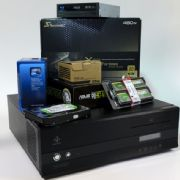
The stack of components used in this HTPC. Note how the case looks like a typical, though somewhat large, AV device.One primary purpose of this system is to play stereoscopic 3D Blu-ray movies. Intel representatives told me that Blu-ray 3D would work fine with 3D HDTVs, using whatever 3D glasses and built-in HDTV technology are available. It won't work, however, with existing shutter glasses for 120Hz PC displays. Intel will enable stereoscopic 3D for PC displays when 120Hz DisplayPort panels ship later in 2011.
Once I got Windows up and running and PowerDVD Ultra 10 installed, I attached the system to a 42-inch Panasonic TC-P42GT25 plasma 3D TV in the PCWorld Labs. This is when that pesky issue with the Intel HD Graphics driver revealed itself. After we downloaded and installed the latest driver, we had glorious stereoscopic 3D. We tried Ice Age 3 3D, IMAX Deep Sea 3D (which looked spectacular), and a sampler of Disney 3D animation clips.

Next Steps

My system is up and running, and handles 3D Blu-ray beautifully. It's now sitting in my rack of AV gear--so I'm tempted to add a 3D HDTV to my own home theater. However, we could add plenty more tricks and features to this HTPC.
First, if you plan to use your HTPC in your entertainment center, you'll want to add IR remote support. The easiest option is USB; a variety of IR dongles support Windows Media Center. If you use one of those, setting up a programmable remote is relatively straightforward. For example, you can easily configure Logitech Harmony remotes to support Media Center IR receivers.
What about gaming? Intel's HD Graphics technology is fine for very light-duty gaming, but if you want to play anything serious, you'll need to add a discrete graphics card--which could lead to other problems. For one thing, that spiffy Intel video processor simply won't work with another graphics card installed, so you'll need to rely on the GPU's own video-decoding capabilities. Although current-generation Nvidia and AMD GPUs have fairly robust video blocks of their own in hardware, any card capable of high-end gaming performance adds heat and noise. And if you still want support for stereoscopic 3D on your HDTV, you'll need the cards using the latest Nvidia 500 series or AMD 5000 or 6000 series graphics processors. (Check to see if your 3D TV works with 3D Vision glasses on Nvidia's compatibility chart.)
When you set up your HTPC, you used a keyboard and mouse to install Windows; for ongoing use, you may want to add a wireless keyboard and mouse combo to the system. Almost any current-generation wireless keyboard and mouse will work, and you'll want something fairly standard if you plan on gaming or doing a lot of typing. However, something like Logitech's DiNovo Mini is very handy if you need only occasional character entry.
Now that you've built your HTPC, you have a complete platform for exploring digital media on the big screen. Since you've set up Blu-ray playback on a PC, updates to the playback software can add new features. You can add HDTV tuner capability, turning your PC into a high-definition DVR, for instance. You can also create a robust digital media server with packages such as the free VLC.Or you can just kick back, put on your 3D glasses, and enjoy the show.
                                                  SUBSCRIBE TO BLOG

Egyptians Find New Routes to the Web


"When countries block, we evolve," an activist with the group We Rebuild wrote in a Twitter message Friday.
That's just what many Egyptians have been doing this week, as groups like We Rebuild scramble to keep the country connected to the outside world, turning to landline telephones, fax machines and even ham radio to keep information flowing in and out of the country.
Although one Internet service provider -- Noor Group -- remains in operation, Egypt's government abruptly ordered the rest of the country's ISPs to shut down their services just after midnight local time Thursday. Mobile networks have also been turned off in some areas. The blackout appears designed to disrupt organization of the country's growing protest movement, which is calling for the ouster of Egyptian President Hosni Mubarak.
"Basically, there are three ways of getting information out right now -- get access to the Noor ISP (which has about 8 percent of the market), use a land line to call someone, or use dial-up," Jillian York, a researcher with the Berkman Center for Internet & Society, said via e-mail.
Egyptians with dial-up modems get no Internet connection when they call into their local ISP, but calling an international number to reach a modem in another country gives them a connection to the outside world.

Rerouting to Dial-Up

We Rebuild is looking to expand those dial-up options. It has set up a dial-up phone number in Sweden and is compiling a list of other numbers Egyptians can call. It is distributing information about its activities on a Wiki page.

One of the dial-up numbers is run by a small ISP called the French Data Network, which said it was the first time it had set up such a service. Its modem has been providing a connection "every few minutes," said Benjamin Bayart, FDN's president, speaking in an online chat.
The international dial-up numbers only work for people with access to a telephone modem and an international calling service, however. So although mobile networks have been suspended in some areas, people have posted instructions about how others can use their mobile phones as dial-up modems.
The few Egyptians able to access the Internet through Noor, the one functioning ISP, are taking steps to ensure their online activities are not being logged. Shortly before Internet access was cut off, the Tor Project said it saw a big spike in Egyptian visitors looking to download its Web browsing software, which is designed to let people surf the Web anonymously.
"We thought we were under denial-of-service attack," said Andrew Lewman, the project's executive director. The site was getting up to 3,000 requests per second, the vast majority of them from Egypt, he said. "Since then we've seen a quadrupling of Tor clients connecting from Noor over the past 24 hours," he said.

Help from Outside

Even with no Internet, people have found ways to get messages out on Twitter. On Friday someone had set up a Twitter account where they posted messages that they had received via telephone calls from Egypt. A typical message reads: "Live Phonecall: streets mostly quiet in Dokki, no police in sight. Lots of police trucks seen at Sheraton."
Others are using fax machines to get information into Egypt about possible ways to communicate. They are distributing fax machine numbers for universities and embassies and asking people to send faxes to those numbers with instructions about how to use a mobile phone as a dial-up modem.
Members of the hacker group Anonymous have also been getting in on the act. They are reportedly faxing some of the latest government cables from Wikileaks, which reveal human rights abuses under President Mubarak, to locations in the country, according to Forbes magazine. We Rebuild describes itself as "a decentralized cluster of net activists who have joined forces to collaborate on issues concerning access to a free Internet without intrusive surveillance." It has set up an IRC for people who can help with ham radio transmissions from Egypt. They are trying to spread the word about the radio band they are monitoring so that people in Egypt know where to transmit.
Some ham enthusiasts are setting up an FTP site where people can record what they hear and post the recordings. So far, they say they've picked up Morse code messages. Allen Pitts, a spokesman for the National Association for Amateur Radio, said no one has picked up any voice transmissions from Egypt for the past couple of days. But it's possible that people in Egypt are transmitting over shorter-range frequencies that carry only 30 or 50 miles, he said.
One problem with ham radio is that most people who know how to use it in Egypt were probably trained by the military and may be opposed to the protests. Others may be wary of transmitting because they are worried about who might be listening.
During earlier protests in Iran and Tunisia, the governments clamped down on specific websites, but access to the Internet was not severed in such a wholescale fashion. It is not unprecedented though. In a blog post Friday written with a colleague, York from the Berkman Center for Internet & Society noted that in 2005 the government of Nepal cut off the Internet connection there, and in 2007 the Burmese government did the same in that country.
                                              SUBSCRIBE TO BLOG